> For the complete documentation index, see [llms.txt](https://wiki.gen6.life/llms.txt). Markdown versions of documentation pages are available by appending `.md` to page URLs; this page is available as [Markdown](https://wiki.gen6.life/education/learn-how-gen6-works/gen6-app-user-guides/gen6-decentralized-identity.md).
# Gen6 Decentralized Identity
### Permissioned Identity Management on Gen6
Gen6 Identity is the decentralized identity layer of our ecosystem. It allows users to create, manage, and share a cryptographically verifiable identity without relying on centralized identity providers.\
\
Your Gen6 Identity answers one critical question:\
**Who is this user, and can this be proven cryptographically?**
The Gen6 Identity system plays a crucial role in proving authorship, enabling trust, and serving as the foundation for Real Seal and NCrypt. It ensures that messages cannot be spoofed, seals have ownership, and encryption is attributed correctly. The system operates with a security model where identity keys are user-controlled, with no recoverable passwords, central key escrow, or personal data exposure. It uses on-chain proofs, and any compromise risk is limited to the user's security. The technical setup involves an on-chain pallet (dataRegistry), middleware (G6 MW or custom providers), an API (G6 MW API), and off-chain, permissioned, user-controlled storage.
**What Is Gen6 Identity?**\
\
In Gen6, an Identity is a cryptographic profile linked to your wallet and account.\
\
It is:
• Decentralized (privacy-proofs)\
• Wallet-linked (self-sovereign or web2 hosted)\
• Cryptographically verifiable\
• Privacy-preserving (data is not shared publicly or with 3rd parties)\
• GDPR-compliant
**How Gen6 Identity Works (High Level):**
• Identity ownership is proven via wallet signatures\
• Identity hashes are stored on-chain (Merkle Tree–based)\
• Personal data is never stored on-chain\
• Identity data lives behind G6 Middleware (MW) or your own trusted providers\
• You decide what is visible and to whom
### Accessing the Identity App
From the Gen6 dApps menu, select Identity.
Gen6 dApps menu with Identity highlighted. This opens the Identity landing page.
### Identity Search & Discovery
The Identity app allows you to search for any public Gen6 Identity by wallet address. Identity Search page (Enter Gen6 address to search).
\
**Use this to:**\
\- Verify identity ownership\
\- View public profiles\
\- Confirm authorship of messages or signatures
### Logging In & Authentication
**To manage your own identity, click View My Identity. You can authenticate using:**\
\
• Wallet login (recommended)\
• Google login (optional, non-custodial)\
\
Choose Login Method modal (Use Wallet / Log in with Google)\
Wallet-based login ensures full cryptographic ownership of your identity.
### Viewing Your Identity Profile
After authentication, your identity profile is displayed.
**Identity profile view (avatar, address, Share / Edit buttons) This page shows:**\
\
• Your profile image\
• Your Gen6 address (identity identifier)\
• Share and Edit options\
• Public links (if enabled)
### Sharing Your Identity
You can share your identity using a secure, verifiable link.\
\
**Share Identity screen (Copy link to share this identity). This link allows others to:**\
\
• View your public identity\
• Verify that the identity belongs to the wallet owner\
• Confirm message or document authorship
### Editing Your Identity
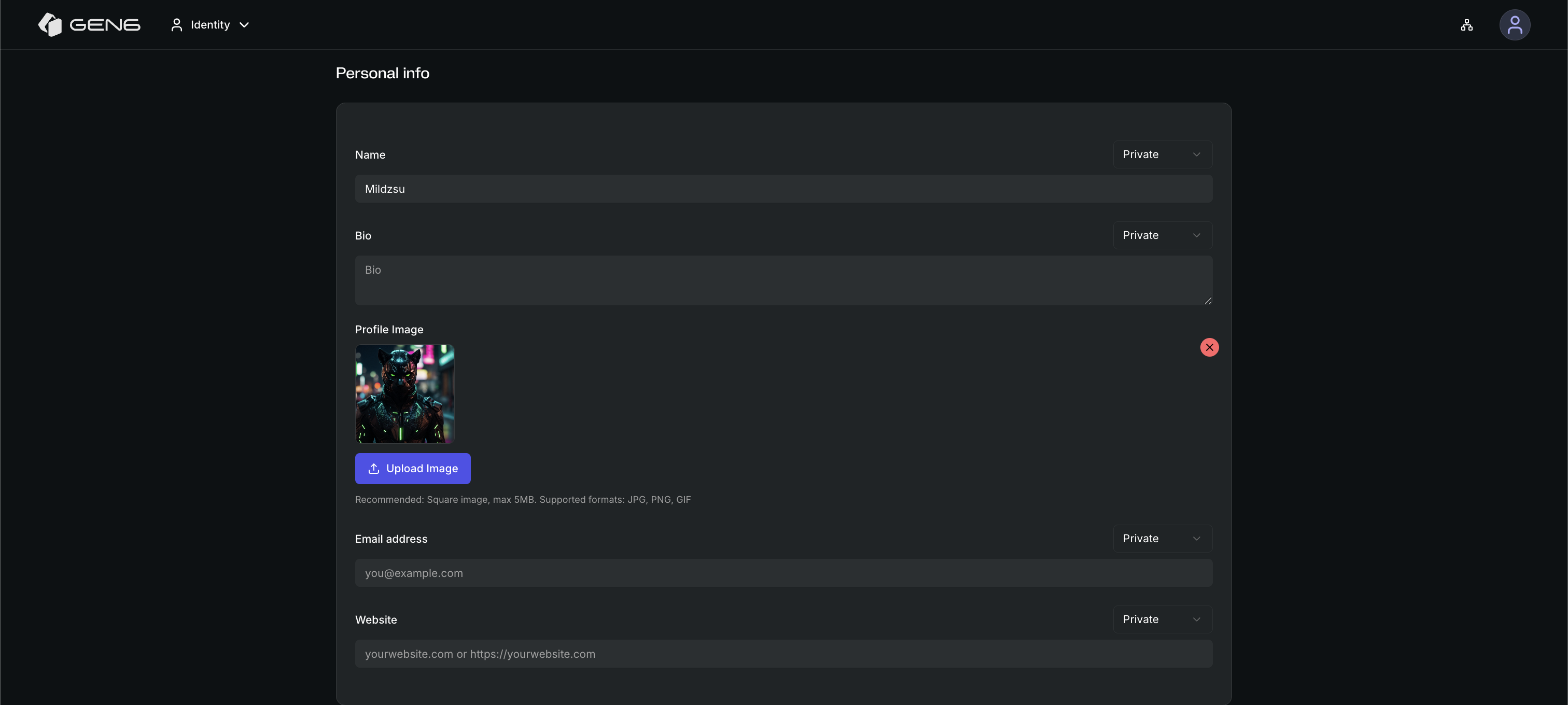
Click Edit to customize your identity profile.
### Identity Edit — Personal Info section
**Identity Edit — Personal Info section. Personal Information:**\
\
• Display name\
• Bio\
• Profile image\
• Email\
• Website\
\
Each field has a visibility setting.
### Social Links
**You can add verified social links to your identity:**\
\
• Telegram\
• X (Twitter)\
• LinkedIn\
• GitHub\
• Mastodon\
• Instagram\
• YouTube\
\
Social links section with visibility selectors.
**Each link can be set to:**\
\
• Private: Default setting. Visible only to you and authorized middleware.\
• Gen6: Visible to authenticated Gen6 users only.\
• Public: Visible to everyone. Ideal for creators, validators, influencers, and public profile.
### Location Information
Optionally, you may add location data. Location selection (Select Country). Location data is never required and always permission-controlled.
### Expertise Tags - coming soon
Expertise tags are automatically assigned based on your Gen6 activity. These tags help establish credibility without exposing personal data.
### Custom Fields
You can add fully customizable fields to your identity. Custom Fields section (Add Custom Field).
**Examples:**\
\
• Company\
• Role\
• Project\
• Interests\
\
Each custom field has its own visibility setting.
### Badge Verification
The Badge is a trust and verification layer within the Gen6 ecosystem that helps distinguish verified and authentic identities from unknown or potentially misleading accounts.
Unlike traditional centralized verification systems, the Badge is not merely a visual badge or platform-controlled status symbol. The verification process is backed by an on-chain blockchain transaction connected to the user’s Gen6 Identity.
This creates a cryptographically verifiable proof that the verification request exists and is tied to the identity owner.
### What the Badge Represents
A Badge indicates that:
• The identity has been reviewed by the Gen6 team or ecosystem moderators\
• The user controls the linked wallet and Gen6 Identity\
• The verification state exists on-chain\
• The profile is considered authentic within the Gen6 ecosystem\
• The account may gain access to additional trusted community features
The Badge does not expose sensitive personal information and does not require public disclosure of private identity data.
### Verification Types
When requesting verification, users can choose between three verification types:
• **Human** — for individual users who want to verify that they are a real person\
• **Organization** — for companies, projects, communities, or official entities\
• **Machine** — for devices, systems, bots, infrastructure, or machine-based identities
These verification types help distinguish different kinds of identities within the Gen6 ecosystem and make it easier to understand whether an identity represents a person, an organization, or a machine.
### Why Badge Matters
As AI-generated profiles, deepfakes, impersonation, and manipulated content become increasingly common, visual trust alone is no longer sufficient.
The Badge introduces blockchain-backed verification into digital identity management by combining wallet ownership, cryptographic verification, on-chain proof, and user-controlled identity.
This helps users identify trusted profiles, reduce impersonation risks, build ecosystem reputation, and participate in trusted communication environments.
### Badge verification is considered a contribution to the Gen6 ecosystem.
Users who successfully obtain a Badge verification are eligible to receive a 1.5 GSX reward.
**To request the reward**:\
*• Send an email to , or contact one of the verification experts through their available contact channels*\
*• Include the Gen6 address used during the Badge verification request*\
*• Request the 1.5 GSX contribution reward*
The verification process helps strengthen the trust and authenticity layer of the Gen6 ecosystem by supporting verified identities and reducing impersonation risks.
**Current Gen6 Verification Experts:**
* [g6A8CaEo9ECfnatQUvT8DWpXpXQo98jpBEeWoLCgo5PxtdJFU](https://gen6.app/identity/g6A8CaEo9ECfnatQUvT8DWpXpXQo98jpBEeWoLCgo5PxtdJFU)
* [g68peU7NpHnfqCLp5zWrVPMppayr3oZ7fiWKYRrjq7A4PKrhz](https://gen6.app/identity/g68peU7NpHnfqCLp5zWrVPMppayr3oZ7fiWKYRrjq7A4PKrhz)
* [g6CCJ4jjxqDVnbPaJBf1XAFcrbDfnEXotc8ganYHQnAQsPEtT](https://gen6.app/identity/g6CCJ4jjxqDVnbPaJBf1XAFcrbDfnEXotc8ganYHQnAQsPEtT)
* [g69XYZrrDBR7TcfSVcV9uwG8Srh17BJV6KnyYXosKqCGcMvyK](https://gen6.app/identity/g69XYZrrDBR7TcfSVcV9uwG8Srh17BJV6KnyYXosKqCGcMvyK)
* [g67iWtLRpUYcLssDr1SFDB3UiJS3SJYVHhnTpqbLS4XwJDpZg](https://gen6.app/identity/g67iWtLRpUYcLssDr1SFDB3UiJS3SJYVHhnTpqbLS4XwJDpZg)
* [g6AkUS6zDbmnv1hjwmYT4vTqwg4XrFFKvJZsAL12w9WnJHrc1](https://gen6.app/identity/g6AkUS6zDbmnv1hjwmYT4vTqwg4XrFFKvJZsAL12w9WnJHrc1)
* [g68KRNPD8uLmSgqijsWSXQZ1Totnt6MSKbW5SAzorjfZQnkfG](https://gen6.app/identity/g68KRNPD8uLmSgqijsWSXQZ1Totnt6MSKbW5SAzorjfZQnkfG)
* [g693RVWSVSUfMAyhRCcntvkUt8CfYs2KibFAsN3J6rs5N2udk](https://gen6.app/identity/g693RVWSVSUfMAyhRCcntvkUt8CfYs2KibFAsN3J6rs5N2udk)
Ask the Gen6 Verification Experts to verify you. Under the current setup, at least two experts must confirm your request, and this threshold is expected to increase as the network scales.
### How to Apply for Badge Verification
To request a Badge, you must first create your Gen6 Identity.
After your Identity has been created, open your Identity profile and select Request to get verified.
Choose the verification type that applies to you: Human, Organization, or Machine.
After selecting the verification type, submit the verification request. This requires signing a blockchain transaction, which anchors the verification request on-chain and connects it to your Gen6 Identity.
Once the request has been submitted, contact Gen6 Support or the community moderators. Send them your G6 address and your Gen6 Identity link so they can review your request and confirm that the identity represents a real human, organization, or machine identity.
**Recommended process**:
1. Create your Gen6 Identity
2. Complete your identity profile
3. Add relevant social links or public information, if available
4. Open your Identity profile
5. Select Request to get verified
6. Choose the correct verification type: Human, Organization, or Machine
7. Submit the request and sign the blockchain transaction
8. Contact Gen6 Support or community moderators
9. Send your G6 address and Gen6 Identity link
10. Complete the review and verification process
Once approved, the Badge becomes part of your verified identity status within the Gen6 ecosystem.
### Verified Badge Display
After a successful verification, the Badge becomes visible on the user’s Gen6 Identity profile.
For Human verification, the Badge appears next to the profile image, indicating that the identity has been verified as a real human within the Gen6 ecosystem.
This provides a clear visual indicator while the underlying verification remains backed by an on-chain transaction tied to the user’s Gen6 Identity.
### Important Notes
• Badge verification is not automatic\
• A verification request requires an on-chain transaction\
• Users must contact Gen6 Support or community moderators after submitting the request\
• Verification may be denied or revoked in cases of impersonation, abuse, misleading activity, or behavior that does not align with the Gen6 community standards\
• A Badge may also be revoked if the identity owner changes category or requests a different verification type. For example, switching from Human to Organization requires a new review and validation process\
• If the Gen6 community or moderators determine that an identity is no longer suitable for verified status, the Badge may be removed\
• Holding a Badge does not grant ownership, authority, or official partnership status within Gen6\
• The system is designed to support trust and authenticity, not social hierarchy


.png?alt=media&token=1eb943ec-88f6-4b1c-b619-4f0f5a53618e)